
Managed boards
Managed boards are shared workspaces that receive updates from their owner and, when enabled, other editors. The owner needs publishing access. Subscribing and editing with an owner's edit key are free.
Subscribe to a board
- Open Settings → Spaces → Sharing → Live boards → Join board.
- Enter the board’s read token and its password, if supplied.
- Select Join board.
The board appears as a workspace tab. It is read-only until you enter an edit key. Public web readers stay read-only.
Share editing access
In Settings → Spaces → Sharing → Live boards, the owner chooses Edit keys on a board. Enter a name such as “Anna”, “Design team” or “Contractor”, then select Add key. Send that key with the board's read token and any board password. Recipients do not need an account or a paid license. Keep your ReadyTab license key private.
Each named key has its own Copy edit key, Rename, Replace edit key and Revoke actions. Replacing or revoking one key affects everyone using that key; other keys continue working. These actions do not remove viewing access or change the board password. Names are owner-assigned labels, not verified identities. Several people can use the same key.
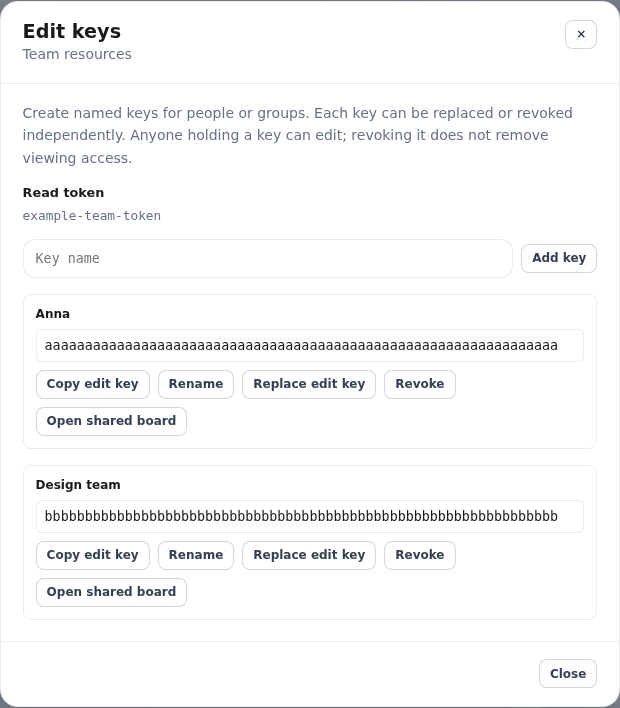
Example names and credentials, shown for illustration.
Key copies are kept on the owner's current device. On another device, replace a key to obtain a new copy, then send it to its intended users. Keys created before named keys were introduced appear as “Shared key” and keep working. You can rename that entry without changing the key.
Recipients choose Enter edit key next to the subscribed board under Sharing → Live boards → Boards you joined. The owner can select Open shared board beside a key to join that same team tab. Use this tab for teamwork; restoring a separate local source is unnecessary.
Saving and conflicts
Changes to board groups, items, tasks and layout save automatically. The status bar shows saving, saved, unsaved or conflict state. While the board is visible, updates are checked every 30 seconds, and immediately when you return to it. Other people’s changes appear automatically when you have no pending edits. Failed saves in the current session retry automatically on the next refresh; you can also retry from the status bar. Recovered changes wait for your review before sending. Other subscribed boards still use the one-minute background refresh.
If another person saved first, ReadyTab keeps your unsaved changes and offers:
- Review conflict: compare the latest shared version with yours before explicitly replacing it with your reviewed version.
- Use latest version: discard your unsaved changes after confirmation.
- Export my changes: download a local copy before deciding.
Pending changes are saved on this device before sending. Saved on this device means sharing is still pending; a shared save is complete only after server acknowledgement. Failed saves can be retried without creating duplicate revisions.
After a reload or interruption, pending changes are recovered for review. They are not automatically uploaded. If someone else changed the board, compare the versions before saving. If access is unavailable, export or discard your pending changes. Unfinished text from board editing forms is available through Unfinished text and in the export, so you can copy it back into the editor.
Recovery drafts exist only while changes or unfinished text are pending. They stay on this device and are kept separately from your ordinary board cache. A successful save removes the acknowledged draft, keeping any newer unsent edits. Discard pending changes removes the recovery draft after confirmation; an export alone keeps it pending. Different tabs keep separate drafts. Normal subscription caching of the acknowledged board is unchanged.
If local recovery storage fails, ReadyTab shows a warning and does not send the save until local storage works again. Keep the tab open and export your changes.
The owner keeps control of board deletion, passwords, branding/publishing and key management. If the owner loses publishing access or your key is replaced or revoked, new saves are blocked and pending edits remain available for recovery. Personal cloud sync and off-grid Notes/Tasks hubs remain separate from shared board editing.
Publishing and source updates
Publishing and management live in Settings → Spaces → Sharing → Live boards. Choose + New live board, select the source workspace, and enter the board name and author/team. A published board remains bound to its original local source space. Updating from that source requires reviewing the changes and selecting that source; shared editors' changes do not automatically update the owner's separate source. If the source is deleted, restore it locally before using source-based updates.