
Spaces
Spaces let you separate different contexts such as work, personal projects, side projects, or team boards.
Default behavior
- The default space is Start
- The default space can be renamed
- The default space cannot be deleted
- The default space stays first in ordering
Multi-space support
- Free includes unlimited local spaces
- New spaces start empty
- Spaces can be renamed
- Spaces can be reordered
- Spaces can be shared as temporary import-code snapshots
- Spaces can be deleted except for the default space
- Groups can be moved between spaces
Overflow behavior
When there are many spaces, the tab bar collapses extra spaces into a More menu.
Sharing behavior
Share codes create encrypted local-copy snapshots, not collaborative sessions. Codes expire after 30 days unless extended or created with no expiry. Manage them from Settings → Spaces → Sharing → Share codes. Expired share-code payloads are deleted automatically.
Open Sharing from the Spaces settings tab to manage Share codes, Public links and Live boards in one place. Import code creates an independent copy; Join board adds a connected team tab.
Free, Sync and Full controls
Free includes unlimited spaces, importing share codes and subscribing to boards. Entering the owner's edit key also allows free team editing. Sync adds personal cloud sync, protection and link health. Full adds creating share codes, publishing public pages and hosting managed/team boards.
Owner-only management controls require Full. Locked sharing actions open the plan comparison. See Plans and licenses.
Protected spaces Sync / Full
- Set a passphrase to protect a space
- Unlocking requires the passphrase
- Protected tabs show a lock indicator
- Canceling an unlock keeps your previous space active
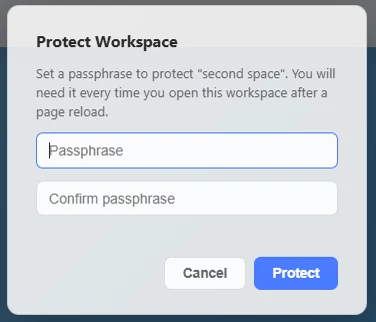
Protect Workspace modal with the passphrase confirmation flow.
Share codes Full
- Sharing creates an encrypted snapshot of one space
- Importing a code creates a local editable copy (a fork)
- Codes expire after 30 days unless extended, or set to never expire
- Create a code from Settings → Spaces → Sharing → Share codes → + New code, then select its source workspace
- Manage created codes in the same tab — search by code or name, use Copy code, or open ⋯ for more actions
- Update code re-snapshots the space into the same code, so new imports get your latest version (people who already imported keep their copy)
- Deleting a code prevents future imports only
Three ways to share
A share code is a one-time editable copy. For a read-only web link or a connected board with optional team editing, see Sharing & publishing.
Per-space visuals
- Theme settings can differ by space
- Backgrounds can differ by space
- Font size and compact mode can differ by space
- Tab underline and theme state can differ by space